
Use case description: A team delivers work within a predefined scope, such as:
-
a fixed number of support hours
-
a customer contract
-
a service period (e.g. monthly support)
A manager needs to track how much effort has been consumed within that scope and how much remains.
In Jira, work is distributed across many issues, making it difficult to understand total consumption within a defined boundary.
(We can show it through JSM prism: clients create requests on JSM portal, agents add request work items to the relevant container, assignee will log their work in hours, they will be taken out of container issue estimate)
Calculation mode: Distributive.
Current Jira setup
Jira does not provide a native way to track effort within a shared container:
-
Issues are independent: Work is logged across multiple unrelated issues.
-
No shared effort boundary: There is no built-in concept of a contract, package, or time budget.
-
Manual tracking required: Teams often rely on external tools or manual calculations.
-
Limited visibility: It is difficult to understand how individual issues contribute to overall consumption.
As a result, tracking consumed effort across a defined scope is fragmented and error-prone.
What TeamTime provides
TeamTime introduces a container-based approach using distributive mode.
-
Define a container work type representing a contract, package, or period
-
Set up a rule to collect all related work within that container (add them manually or set up automation rules)
-
Aggregate logged time within the defined boundary
-
View total consumption, remaining hours, and progress
-
Analyze how individual issues contribute to the total.
How it works
-
Configure a container work item in your project:
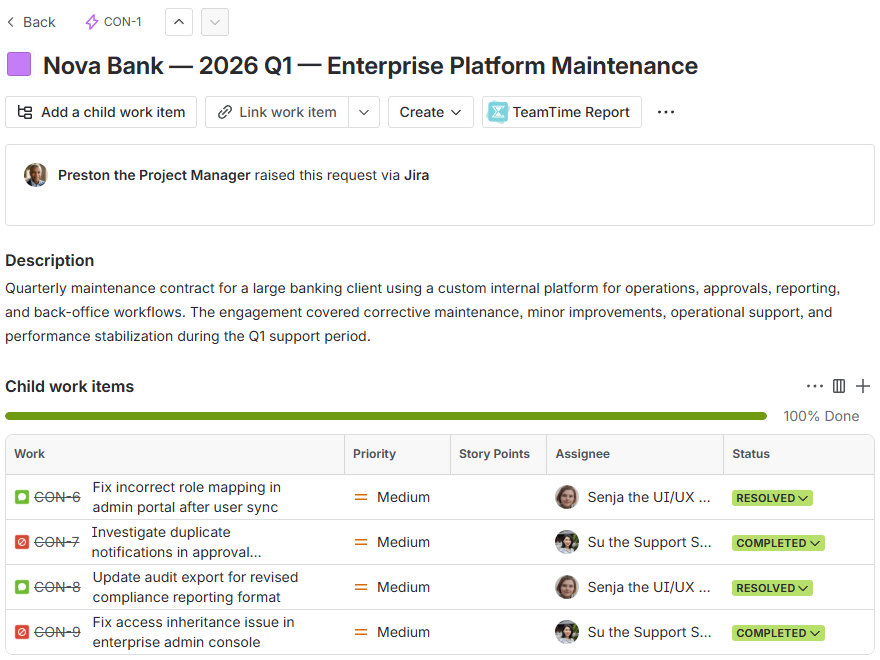
Container must be configured within a distributive mode space. Check here how to change the calculation mode of your space.
-
Have a look at TeamTime custom fields which display the info about the container work item:
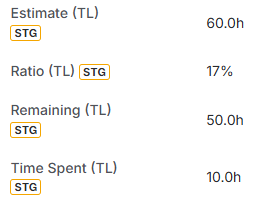
-
Head to the TeamTime for Jira app section to track work in related work items:
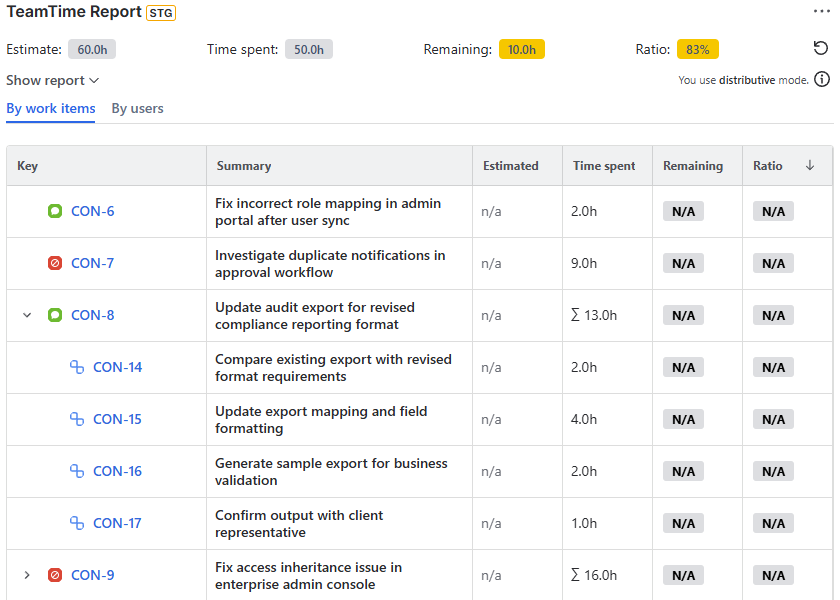
The row above the mini-report reflects the container’s state. As you navigate between the work items within this container, this row will remain the same to keep you updated on the total pool of hours regardless of where you are within the container tree.
The Estimates of the work items within the container are ignored, and therefore Remaining and Ratio fields are not going to have any value. What matters are the Estimate of the container work item and its Remaining. TeamTime automatically collects and calculates all effort within the container scope.
Result
Teams and managers can:
-
Track how much of a contract or package has been used
-
Monitor remaining capacity in real time
-
Maintain a clear connection between individual work items and overall consumption.
Stay informed
Subscribe to get the latest updates and explore new product capabilities