
Before exploring how to create and manage reminders, it is helpful to understand the core terms used throughout this documentation. In Reminder for Jira, reminders are categorized primarily by their privacy scope:
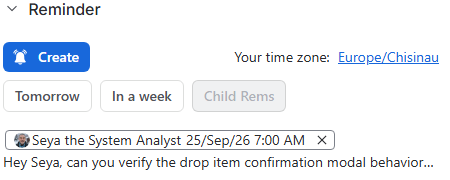
Public Reminders
-
Visibility: Visible to any user who holds the Browse public reminders within issues space-level permission for that project.
-
Where they appear: Displayed openly in the Reminder context panel on Jira work items.
-
Use Case: Team-wide visibility, shared deadlines, or open check-ins on project deliverables.
Private Reminders
-
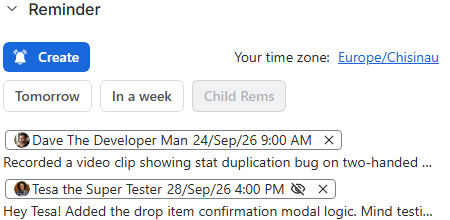
Visibility: Restricted exclusively to the creator and the specified recipients. Other users viewing the same Jira issue will not see the reminder entry.
-
Visual indicator: For the creator and recipients, private reminders appear in the work item’s context panel accompanied by a crossed-out eye icon (👁️🗨️), indicating that the content is hidden from the rest of the team:
-
Use Case: Direct 1-on-1 follow-ups, sensitive review requests, or targeted peer nudges.
Personal Reminders
-
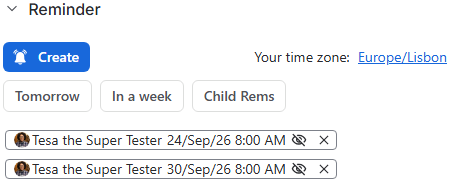
Visibility: Reminders sent exclusively to yourself.
-
Privacy Scope: Always strictly private, regardless of whether they are attached to a Jira work item or created as a standalone task.
-
Where They Appear: Displayed in your personal To-Do queue on the Main App Page, as well as in the Reminder context panel on linked work items (visible only to you).
-
Use Case: Individual task tracking, personal check-ins, self-scheduled review dates, and day-to-day to-do items.
🔒 Note on Administrator Privacy
Jira Administrators cannot read the contents of your private or personal reminders. Within the global administrative queue, the messages for these reminders are masked with a Restricted Content indicator to safeguard user privacy.
Administrative Exception: A Jira Administrator can only view private or personal reminder content if they explicitly use Jira's Log in as user impersonation feature to access your account—a system-level action that automatically triggers a security notification email to your inbox.
Stay informed
Subscribe to get the latest updates and explore new product capabilities