
As a Jira Administrator, you have access to a centralized audit trail that tracks all lifecycle events, configuration modifications, and administrative actions performed on reminders across your Jira instance.
Accessing the Logs tab
-
In Jira's main navigation bar, select Apps -> Manage your apps.
-
In the left menu under Teamlead Reminder, select Reminder Queue.
-
Click the Logs tab at the top of the interface.
Log data fields
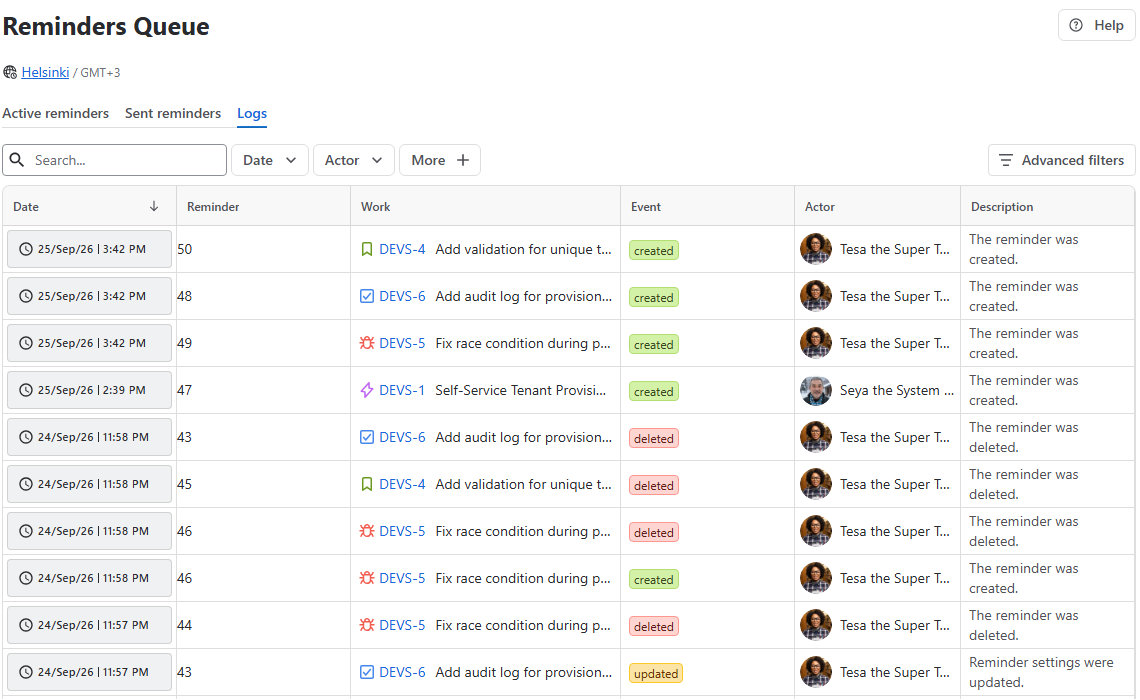
Each entry in the audit log captures full contextual metadata for every recorded action:
|
Field |
Description |
|
Date |
Exact timestamp (date and time) when the change was logged. |
|
Reminder |
Title or unique identifier of the affected reminder. |
|
Work |
Linked Jira work item key, if applicable. |
|
Event |
The specific type of lifecycle or modification event triggered. |
|
Actor |
The user or system automation process that executed the action. |
|
Description |
Detailed breakdown of the exact changes made to reminder properties. |
Tracked event types
The log registers five distinct event types to help admins audit activity and troubleshoot unexpected changes:
-
Created: A new reminder was created (manually or via Jira Automation).
-
Updated: Non-date properties were modified (e.g., changing recipients, editing the message, toggling Send as a comment, or changing a recurring schedule to a one-time reminder).
-
Rescheduled: The target trigger date or execution timestamp was modified.
-
Cancelled: A one-time reminder was converted into a recurring schedule, replacing the original single trigger event.
-
Deleted: A reminder was permanently removed from the instance (either inline by a user or globally by an admin).
Stay informed
Subscribe to get the latest updates and explore new product capabilities