
To start working with company or contact card you need to create attributes for these objects in CRM settings. Attribute properties and their types are listed below.
Attribute Types
The type of attribute is one of the attribute properties. The set of other attribute properties depends on the attribute type.
|
Attribute Type |
Export |
Description |
Companies dir. |
Contacts dir. |
Products dir. |
Transactions dir. |
Budgets dir. |
Custom dir. |
Custom Companies dir. |
|---|---|---|---|---|---|---|---|---|---|
|
Attachments |
|
It allows you to attach files to the card. |
⛔ |
⛔ |
⛔ |
⛔ |
⛔ |
⛔ |
|
|
Author |
+ |
The auto-populated field displays the name of the entry creator. |
⛔ |
⛔ |
⛔ |
|
⛔ |
⛔ |
⛔ |
|
Checkbox |
+ |
Single-choice checkbox (yes\no options) |
|
|
|
|
|
|
|
|
Child companies |
|
This field is used for selecting child companies in company cards. You can enter a new value here, a new company will be created in the company directory. |
|
⛔ |
⛔ |
⛔ |
⛔ |
⛔ |
|
|
Company |
+ |
This field is used for selecting a company in the contact card. Contact can be related to only one company at the moment. You can enter a new value here, a new company will be created in the company directory. 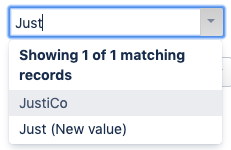
|
|
⛔ |
⛔ |
|
|
⛔ |
|
|
Contact |
+ |
This field is used for selecting the main contact/contacts of the company. It is used for displaying the main contact in the company dictionary or for the searching company by contact. There can be several fields of Contact type in Company cards with different contacts selected. 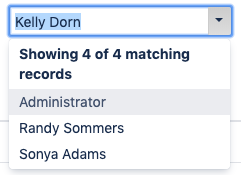
|
|
⛔ |
⛔ |
|
|
⛔ |
|
|
Contacts |
|
List of contacts related to the company. Select fields to show in the Company card. You can add/edit/remove contacts here. 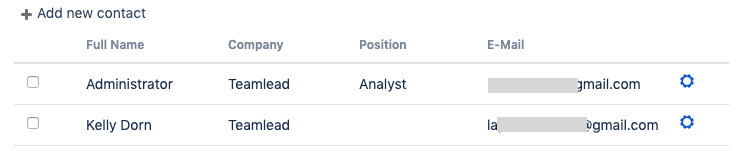
|
|
⛔ |
⛔ |
⛔ |
⛔ |
⛔ |
|
|
Counter |
+ |
Field to automatically set the order number to Company records. |
|
|
⛔ |
⛔ |
⛔ |
⛔ |
|
|
Creation date |
|
Field to store record creation date (fills in automatically, not editable). 
|
|
|
⛔ |
⛔ |
⛔ |
⛔ |
|
|
Creator |
|
Field to store record creator name (fills in automatically, not editable). |
|
|
⛔ |
⛔ |
⛔ |
⛔ |
|
|
Created at |
+ |
The auto-populated field displays the date and time of the entry creation. 
|
⛔ |
⛔ |
⛔ |
|
⛔ |
⛔ |
⛔ |
|
CRM Directory Attribute |
+ |
Field to store some attribute from a custom directory that is set for "Directory" (see above) attribute. For example, the Product has an attribute "Currency" of Directory type which is linked to the custom directory "Currencies". "Currencies" directory has an attribute "Dollar exchange rate". Use Directory Attribute type if you want to add "Dollar exchange rate" to Product when you select the currency in "Currency" attribute. |
|
|
|
|
|
|
|
|
Date |
+ |
Date picker with a calendar for date type attributes such as "Contact birthdate". |
|
|
|
⛔ |
|
|
|
|
Direction |
|
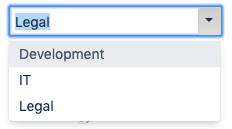
|
⛔ |
⛔ |
⛔ |
⛔ |
|
⛔ |
⛔ |
|
Directory |
+ |
Field to store some value from specified CRM custom directory (only one value). It's possible to add new values to the directories through the fields of this type. The directory should be specified in the attribute property "Directory". |
|
|
|
|
|
|
|
|
|
+ |
Clickable email ("mailto:" prefix) |
|
|
⛔ |
⛔ |
⛔ |
⛔ |
|
|
E-mail is valid |
+ |
Checkbox to show if contact's e-mail passed through validation during the Direct Mail process. |
⛔ |
|
⛔ |
⛔ |
⛔ |
⛔ |
⛔ |
|
End date |
|
|
⛔ |
⛔ |
⛔ |
⛔ |
|
⛔ |
⛔ |
|
English name |
|
|
⛔ |
⛔ |
⛔ |
⛔ |
⛔ |
|
⛔ |
|
Epic |
|
Field to store Epic name in Transactions if a transaction is in issue which is part of an Epic. |
⛔ |
⛔ |
⛔ |
|
⛔ |
⛔ |
⛔ |
|
JQL |
|
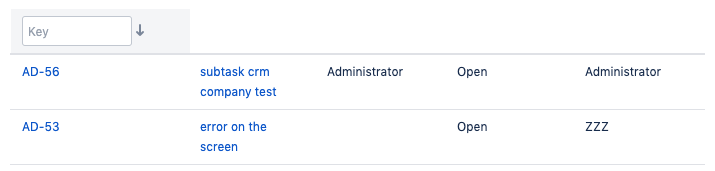
This table-field displays JIRA issues by JQL-filter with necessary attributes. The value must be specified as JQL-filter in attribute property "JQL condition"
Example of JQL condition: "project = SALE AND issuetype = SALE AND 'Company' = CURRENT_NAME"
|
|
|
⛔ |
⛔ |
⛔ |
⛔ |
|
|
JIRA groups |
+ |
Type to store one or more JIRA groups. It's possible to give additional CRM permisions for JIRA users, stored in fields of this type. See more there: Setting up Access to Objects |
|
|
⛔ |
⛔ |
⛔ |
⛔ |
|
|
JIRA user |
+ |
Type to store one or more JIRA users, for example account manager of a company. It's possible to give additional CRM permisions for JIRA users, stored in fields of this type. See more there: Setting up Access to Objects 
|
|
⛔ |
⛔ |
|
|
|
|
|
Included budget |
|
|
⛔ |
⛔ |
⛔ |
⛔ |
|
⛔ |
⛔ |
|
Issue custom field |
|
|
⛔ |
⛔ |
⛔ |
|
⛔ |
⛔ |
⛔ |
|
Last edit date |
|
|
⛔ |
⛔ |
⛔ |
|
⛔ |
⛔ |
⛔ |
|
last editor |
|
|
⛔ |
⛔ |
⛔ |
|
⛔ |
⛔ |
⛔ |
|
Linked company |
+ |
|
⛔ |
|
⛔ |
⛔ |
⛔ |
⛔ |
⛔ |
|
List of values |
+ |
Used for selecting one value from the cascading list. For example, "Company type" or "Branch". Possible values should be set in attribute property "Field values". For example: "1:Client;2:Rival;3:Partner;4:Agency" 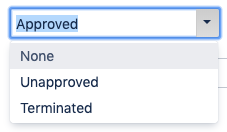
|
|
|
|
|
|
|
|
|
Main email |
+ |
The field for storing email for Direct Mailing. |
⛔ |
|
⛔ |
⛔ |
⛔ |
⛔ |
⛔ |
|
Multi Directory Items |
+ |
Field to store several values from a specified CRM custom directory. The dictionary should be specified in the attribute property "Dictionary". 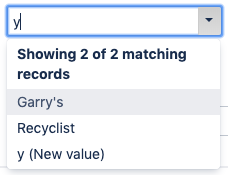
|
|
|
⛔ |
⛔ |
⛔ |
|
|
|
No subscribe me |
+ |
Checkbox to show if contact had unsubscribed from Direct Mail. |
⛔ |
|
⛔ |
⛔ |
⛔ |
⛔ |
⛔ |
|
Number |
+ |
Integer number (positive). For example, "Number of users". |
|
|
|
|
|
|
|
|
Parent company |
+ |
This field is used for selecting parent company in company card. Parent company can have many child companies but only one parent can be set for company. Parent-child relations may be ussed for set issue security, see more 
|
|
⛔ |
⛔ |
⛔ |
⛔ |
⛔ |
|
|
Period name |
|
|
⛔ |
⛔ |
⛔ |
⛔ |
|
⛔ |
⛔ |
|
Phone |
+ |
|
⛔ |
|
⛔ |
⛔ |
⛔ |
⛔ |
⛔ |
|
Plan |
|
|
⛔ |
⛔ |
⛔ |
⛔ |
|
⛔ |
⛔ |
|
Products |
|
|
|
⛔ |
⛔ |
⛔ |
⛔ |
⛔ |
⛔ |
|
Progress |
|
|
⛔ |
⛔ |
⛔ |
⛔ |
|
⛔ |
⛔ |
|
Progress % |
|
|
⛔ |
⛔ |
⛔ |
⛔ |
|
⛔ |
⛔ |
|
Rating with stars |
|
|
⛔ |
⛔ |
⛔ |
⛔ |
⛔ |
⛔ |
|
|
Related Projects |
|
You could link some companies and contacts with any JIRA project. |
|
|
⛔ |
⛔ |
⛔ |
⛔ |
|
|
Separator |
|
|
|
|
|
|
|
|
|
|
Status date |
|
Field to store date of Transaction's status changing. |
⛔ |
⛔ |
⛔ |
|
⛔ |
⛔ |
|
|
String (255 chars) |
+ |
For simple string-type attributes such as "Address", "Working schedule", etc. 
|
|
|
|
|
|
|
|
|
Table list |
|
Places a table into Company / Contact card from Table Lists sub-menu. |
|
|
⛔ |
⛔ |
⛔ |
⛔ |
|
|
Textarea |
+ |
For multiple string type attributes. Maximum length is 400 symbols (including space and enter). 
|
|
|
|
⛔ |
⛔ |
|
|
|
Transactions |
|
List of transactions related to the company. You can select fields to show in Company card and in Issue transaction view. |
|
|
⛔ |
⛔ |
⛔ |
⛔ |
|
|
Updated date |
+ |
An attribute with the auto-populated date and time of the latest entry update. 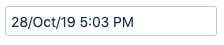
|
|
|
⛔ |
⛔ |
⛔ |
⛔ |
|
|
Updator |
|
An attribute with the auto-populated full name of a user updated the entry. 
|
|
|
⛔ |
⛔ |
⛔ |
⛔ |
|
|
Website |
+ |
Type to store Website address of a company (https://…) view mode: 
edit mode: 
|
|
|
|
⛔ |
⛔ |
⛔ |
|
|
Worklog |
+ |
An attribute with the auto-populated value for the estimated/remaining/logged time from the relevant Jira issues. 
|
|
⛔ |
⛔ |
⛔ |
⛔ |
⛔ |
|
Attribute Properties
Properties common to all types
|
Property |
Type of property value |
Description |
|---|---|---|
|
Field title |
String |
This value will be displayed in a card or dictionary. |
|
Field type |
Cascading Select list of types |
There are fixed set of attribute types with unique features. See full list and description in the table above. |
|
Show in grid |
Checkbox |
If checked this property will be shown in the directory as a column. |
|
Is title |
Checkbox |
⚠ This is the most important property. It must be checked only in one attribute - usually company or contact name. It shows that this is a key attribute and is used in dictionaries for searching company/contacts. If this property is checked in another attribute it will be unchecked in current attribute. |
|
Is required |
Checkbox |
If checked the system will require users to fill in the attribute before saving contact/company. |
|
Show in a CRM name field |
Checkbox |
If checked the attribute will be shown in brackets in the field marked as "is title" in CRM directories. |
|
Show in CRM custom fields |
Checkbox |
Company/Contact issue fields format. If checked the attribute will be shown in brackets with contact (company) name in issue's CRM custom field. |
|
Is read only |
Checkbox |
If checked this attribute will not be available for editing. |
|
From creation |
Checkbox |
This property is pared to "read only". If checked the attribute will be not editable from the moment of it's creation. Unchecked allows to fill in the attribute while creating new record in CRM directory. |
|
Restrict duplicates |
Checkbox |
If checked the system will examine if the same value for this attribute already exists in CRM directory and decline creation (import) of duplicate. Note that duplicates restriction works only for creating entries within CRM. Since we cannot control the restrictions for any of the source fields (i.e, full name of a user in case of contacts to users synchronization) duplicates may appear from such sources. |
|
To search by |
Checkbox |
If checked the system will use this attribute for searching in addition to company name. It is useful if you have two fields for name in English and in Russian. If you check this property in "Russian name" attribute you can search company by either Russian or English name. |
|
Fields |
String |
See full list and description in the table below. |
|
Tab |
Cascading Select list of tabs |
The tab on which to put the attribute. If the tab list is empty - just create tabs in tab table. |
|
Width |
Integer |
The width of the attribute in pixels. Important for fields like "address", "full name", etc. |
|
By default |
Checkbox |
Is used for Checkbox attribute type. If unchecked, new records will be created with unchecked checkbox attribute. If checked - checkbox attribute will be checked by default for new records. Notice that for existing records checkbox attribute is created unchecked. |
|
Set from company |
checkbox |
Is used in Transactions |
Special properties for some attributes types
|
Property |
Type of attribute |
Type of property value |
Description |
|---|---|---|---|
|
Directory |
Directory Multi Directory Values |
Select list of custom directories |
Specify a custom directory in this field, to choose values from. |
|
JQL condition |
JQL |
JQL-filter |
The value must be specified as JQL-filter in attribute property "JQL condition"
Example of JQL condition: "project = SALE AND issuetype = SALE AND 'Company' ~ CURRENT". Notice that JQL can be not larger than 250 symbols. |
|
Fields |
JQL |
String |
This property allows to set columns which would be shown in Company table attributes like issues (JQL), transactions, contacts.
1. For JQL attribute type If not set in the "JQL" field there will be only 3 standard columns (issuekey, summary and status). If you need additional issue fields displayed in the "JQL" field you must enter JIRA customfields ID's (without spaces). Example: "issuekey,customfield_14440,summary,customfield_10163,status". All available fields:
2. For Contacts attribute type. You may set contacts attributes names (without spaces between field names and commas). 3. For Transactions attribute type. You may set transactions attributes names (without spaces between field names and commas). |
|
Field values |
list of values |
String |
Possible values of a list should be set in this property "Field values". |
|
Set from company |
Directory |
Checkbox |
Is used in Transactions Directory attribute. When checked directory value is taken automatically from the same "Directory" attribute of Company. |