.png)
SLA Project Scope
Before you begin configuring SLAs, you need to establish your global SLA Project Scope. This scope determines where and how SLA functionality is applied across your Jira instance, ensuring that only the intended projects and issue types are included.
Defining Your SLA Project Scope
Navigate to Jira Administration → HelpDesk → General Settings and complete the following:
Projects
Select one or more projects in which SLA options should be visible to project administrators. Only these projects will display the “HelpDesk SLA” in the “Addons“ tab, and only they will be able to define project-specific SLAs.Issue Types
Choose which issue types—such as Bug, Task, Story, or custom types—can have SLA goals applied. Limiting issue types helps avoid unnecessary timers on issue types that don’t need formal response or resolution targets.Team Field
Limit custom fields (single select list) in Jira that identifies your support teams (for example, “Support Group” or “Assigned Team”). Selected fields can be used when you configuring OLA (team-level) goals, ensuring that only relevant custom fields appear in your SLA setup.
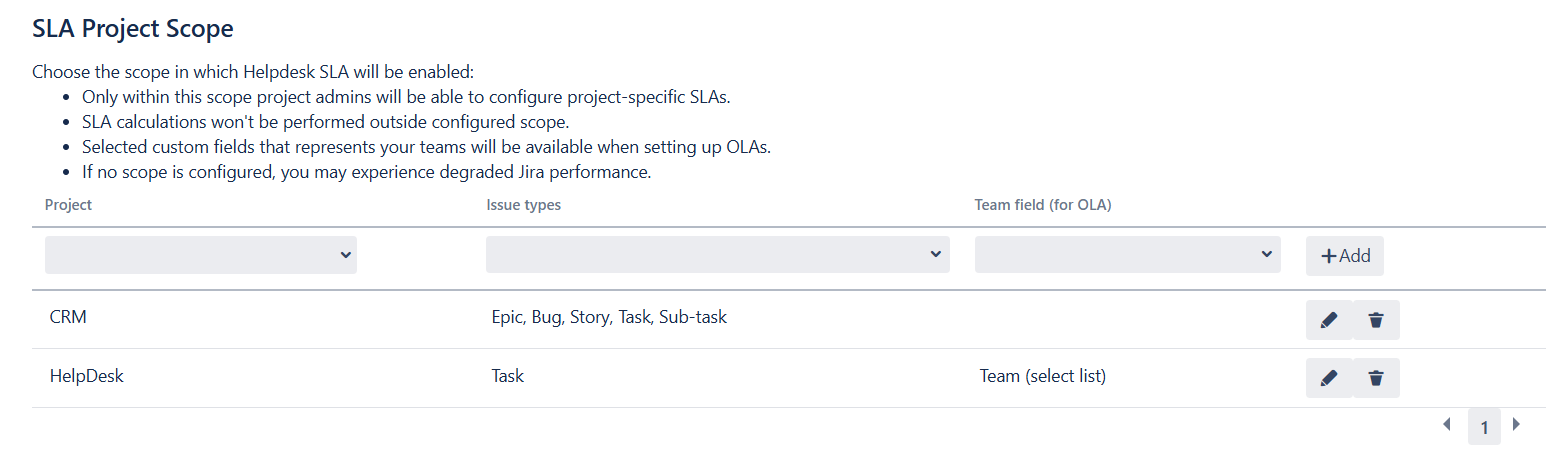

Both Issue Types and Team Field can be left empty:
leaving Issue Types blank means SLAs will apply to all issue types (and any issue type can be chosen for project-specific SLA);
leaving Team Field blank allows any single-choice select-list custom field to be used for teams when configuring OLA.
Once these settings are saved, every project you included will show a HelpDesk SLA tab under Project → Add-ons → HelpDesk SLA. Project administrators in those projects can then:
Create and edit SLA goals specifically for their workflows
Apply team-level OLAs using the designated Team Field
Fine-tune start, pause, stop, and reset conditions

Important Performance Consideration
By default, if you leave the SLA scope undefined, HelpDesk will calculate SLAs on all applicable issues (according to SLA settings). In large Jira instances, this can sometimes lead to noticeable performance degradation. To prevent potential performance issues, it’s best practice to explicitly configure your SLA Project Scope — limiting SLA calculations only to the projects and issue types you choose.